300 DPI in Pixels
Pixels = inches × DPI. The tables below are that formula worked out for A-series, Letter, photo prints, cards, and posters — at 150, 300, and 600 where the spec actually changes.
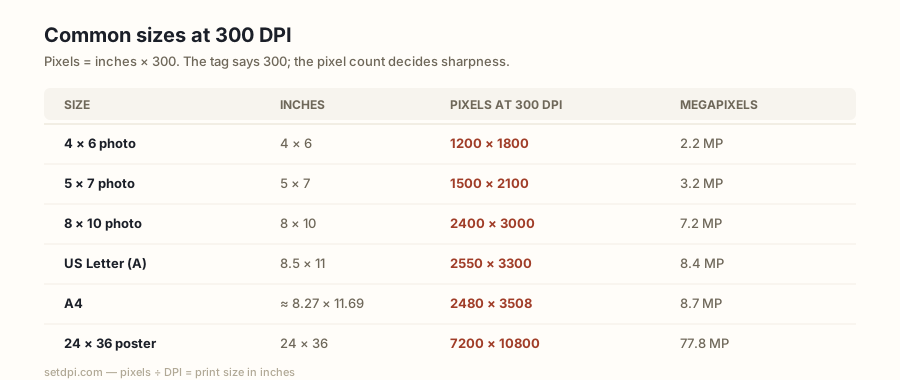
The formula and why 300
300 DPI in pixels is inches times 300, rounded to a whole pixel. Millimetres convert first: inches = mm ÷ 25.4. Every cell on this page is round(size_in × DPI) with that conversion. A4 is 210 × 297 mm, so 210 ÷ 25.4 × 300 = 2480.31 → 2480, and 297 ÷ 25.4 × 300 = 3507.87 → 3508. Letter is already in inches: 8.5 × 300 = 2550, 11 × 300 = 3300. A 4 × 6 in photo is 1200 × 1800. That is the whole conversion.
Why 300, not 250 or 360? Photo labs, magazines, business-card printers, and most upload forms settled on 300 as “photo quality” at reading distance. At about 25–30 cm, the eye stops resolving a finer grid on a continuous-tone photograph. 150 is the usual poster spec because people stand several feet back. 600 is for hairlines and small type, which cannot hide a coarse sample the way a photograph can. 72 and 96 are leftover screen defaults; they do not describe a print.
The tag and the pixel count are different jobs. Pixels = inches × DPI tells you the grid you need. Writing 300 into JFIF, EXIF XResolution, or PNG pHYs tells a preflight script you meant that grid. Do both. A 4000-pixel file tagged 72 still fails a “300 DPI” checker. An 800-pixel file tagged 300 still prints a 2.7-inch-wide photo. Orientation is yours to swap: tables list the named size in the usual portrait or landscape for that stock. Rotate the print, swap the two numbers. The formula does not change.
A-series at 300 DPI
ISO A-series paper keeps a √2 aspect ratio, so each size is the previous one cut in half. Pixel counts follow that cut, after rounding. A4 300 DPI pixels — the other half of the search — are 2480 × 3508. A3 is 3508 × 4961, almost A4 doubled on the short side. A5 is 1748 × 2480. A2 is 4961 × 7016. A1 is 7016 × 9933. A0 is 9933 × 14043, a plotter sheet.
| Size | Millimetres | 150 DPI | 300 DPI | 600 DPI |
|---|---|---|---|---|
| A0 | 841 × 1189 | 4967 × 7022 | 9933 × 14043 | 19866 × 28087 |
| A1 | 594 × 841 | 3508 × 4967 | 7016 × 9933 | 14031 × 19866 |
| A2 | 420 × 594 | 2480 × 3508 | 4961 × 7016 | 9921 × 14031 |
| A3 | 297 × 420 | 1754 × 2480 | 3508 × 4961 | 7016 × 9921 |
| A4 | 210 × 297 | 1240 × 1754 | 2480 × 3508 | 4961 × 7016 |
| A5 | 148 × 210 | 874 × 1240 | 1748 × 2480 | 3496 × 4961 |
| A6 | 105 × 148 | 620 × 874 | 1240 × 1748 | 2480 × 3496 |
150 DPI columns are there because large A-sizes are often posters. A2 at 150 is 2480 × 3508 — the same pixel budget as A4 at 300. That is the viewing-distance trade: stand back, spend fewer samples. 600 DPI columns are for line art on the same sheet. A4 at 600 is 4961 × 7016, which is A2 at 300. Each cell is rounded on its own, not by doubling a 300 column; A0 at 600 is 19866 × 28087, not 14043 × 2 on the long side. Bleed is extra: if a printer wants 3 mm around A4, add that to 210 × 297 before you multiply. The table is the trimmed sheet.
US paper sizes
North American stock is already in inches, so the arithmetic is cleaner. Letter (8.5 × 11 in) at 300 DPI is 2550 × 3300 — the US counterpart to A4 300 DPI pixels. Legal (8.5 × 14) is 2550 × 4200. Tabloid (11 × 17), the sheet people mean when they say “ledger” in landscape, is 3300 × 5100. Half Letter (5.5 × 8.5), a booklet page or a flyer folded once, is 1650 × 2550.
| Size | Inches | 150 DPI | 300 DPI | 600 DPI |
|---|---|---|---|---|
| Letter | 8.5 × 11 | 1275 × 1650 | 2550 × 3300 | 5100 × 6600 |
| Legal | 8.5 × 14 | 1275 × 2100 | 2550 × 4200 | 5100 × 8400 |
| Tabloid | 11 × 17 | 1650 × 2550 | 3300 × 5100 | 6600 × 10200 |
| Half Letter | 5.5 × 8.5 | 825 × 1275 | 1650 × 2550 | 3300 × 5100 |
150 and 600 columns scale exactly on these sizes because the inch sides are terminating decimals. Letter at 150 is 1275 × 1650; at 600 it is 5100 × 6600. A KDP interior, a school worksheet, or a US office poster that specifies Letter at 300 wants 2550 × 3300, plus whatever bleed the template added. Do not send A4 pixels to a Letter job and hope the RIP crops politely — 210 mm is 8.27 in, not 8.5.
Photo prints
Labs sell inches. 4 × 6, 5 × 7, 8 × 10, 11 × 14, 16 × 20, and 20 × 30 are the common bins. At 300 DPI those are 1200 × 1800, 1500 × 2100, 2400 × 3000, 3300 × 4200, 4800 × 6000, and 6000 × 9000. A modern phone often has 4 × 6 and 5 × 7 covered and a 72 tag. The 16 × 20 and 20 × 30 rows are where pixel count, not the tag, becomes the constraint.
| Size | 300 DPI | 600 DPI |
|---|---|---|
| 4 × 6 in | 1200 × 1800 | 2400 × 3600 |
| 5 × 7 in | 1500 × 2100 | 3000 × 4200 |
| 8 × 10 in | 2400 × 3000 | 4800 × 6000 |
| 11 × 14 in | 3300 × 4200 | 6600 × 8400 |
| 16 × 20 in | 4800 × 6000 | 9600 × 12000 |
| 20 × 30 in | 6000 × 9000 | 12000 × 18000 |
600 DPI doubles every number: 4 × 6 becomes 2400 × 3600. Minilabs almost never need that for a photograph. Scan a print at 600 if you want to enlarge later; do not relabel a 1200 × 1800 camera JPEG as 600 and order a 4 × 6 expecting extra detail. Crop is the silent extra. A 4:3 camera file is not a 2:3 4 × 6. You will lose pixels to the lab’s crop, so having exactly 1200 × 1800 on a 4:3 original is not enough. Count after crop.
Cards and posters
A US business card is 3.5 × 2 in, so 1050 × 600 px at 300 DPI. The 85 × 55 mm card used in much of Europe is 1004 × 650. Those are small grids. A logo drawn at 400 px will look soft; a photograph will not. A7 (74 × 105 mm) is 874 × 1240 — a folded place card or a small invitation. A 6 × 4 in postcard is 1800 × 1200, the same budget as a 4 × 6 print. The 148 × 105 mm postcard (A6 landscape) is 1748 × 1240.
| Size | 300 DPI |
|---|---|
| Business card 3.5 × 2 in | 1050 × 600 |
| Business card 85 × 55 mm | 1004 × 650 |
| A7 (74 × 105 mm) | 874 × 1240 |
| Postcard 6 × 4 in | 1800 × 1200 |
| Postcard 148 × 105 mm | 1748 × 1240 |
Posters are where 150 earns its column. 18 × 24 in at 150 is 2700 × 3600; at 300 it is 5400 × 7200. 24 × 36 in at 150 is 3600 × 5400; at 300 it is 7200 × 10800 — a file many cameras cannot supply, for a wall people view from several feet. A2 and A1 repeat the A-series numbers: 2480 × 3508 / 4961 × 7016 at 150 / 300 for A2, 3508 × 4967 / 7016 × 9933 for A1.
| Size | 150 DPI | 300 DPI |
|---|---|---|
| 18 × 24 in | 2700 × 3600 | 5400 × 7200 |
| 24 × 36 in | 3600 × 5400 | 7200 × 10800 |
| A2 (420 × 594 mm) | 2480 × 3508 | 4961 × 7016 |
| A1 (594 × 841 mm) | 3508 × 4967 | 7016 × 9933 |
Your file has the pixels — now set the tag
The tables are a planning tool. They do not change a file. Once the pixel grid covers the row you need, write 300 into the density field so a lab or a portal does not reject you for a leftover 72. Convert Image to 300 DPI does that in the browser. Confirm the current tag and the print size with the DPI Checker. Plan a size you do not have a file for yet with the DPI Calculator. For which integer a product actually wants — 300 in the hand, 150 on the wall — see DPI for Printing.
600 DPI is the other common ask. Line art, contracts with 8-point footnotes, and some giclée shops want 600 samples per inch. That is a different pixel budget — inches × 600 — and a different tag. Convert Image to 600 DPI rewrites the integer when the samples are already there. Inventing 600 from a short JPEG does not add detail.