Passport Photo DPI Changer
Most online portals check pixel dimensions. Print shops and some forms ask for a DPI value — this sets the value without touching the image.
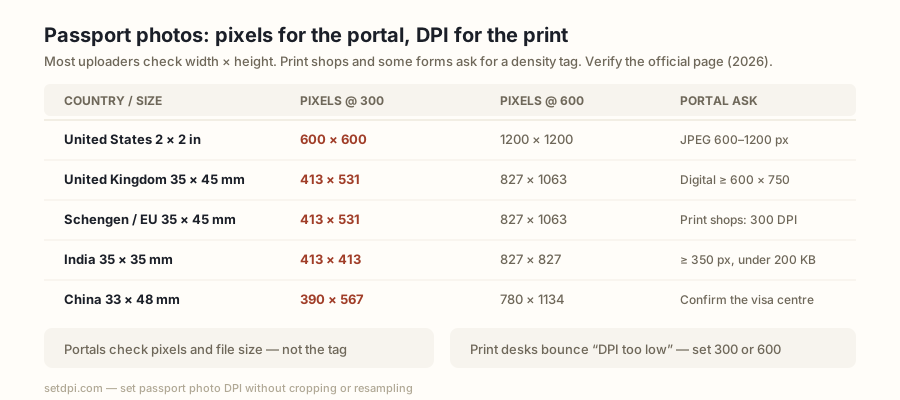
What passport photo portals actually check
Most online passport and visa portals do not read the DPI tag. They check pixel dimensions (width × height) and file size (often a JPEG under a few hundred kilobytes). A 600 × 600 px JPEG tagged 72 DPI and the same JPEG tagged 300 DPI are the same pixels; a portal that wants 600 × 600 px will accept both. Passport photo DPI is a print instruction: how many of those pixels sit in one inch of paper. When a form, a photo kiosk, or a print shop asks for 300 DPI or 600 DPI, they are asking for that print instruction, not for more pixels.
This page sets the value without touching the image. Drop a JPG or PNG above, keep 300 (or switch to 600), and download. JFIF and EXIF density on JPEG, or the PNG pHYs chunk, are rewritten in your browser. Pixel samples are not decoded or recompressed. Nothing is uploaded.
Say this plainly: if the portal rejected the file for being too small, the pixel count is the problem — changing DPI will not invent pixels. If a print desk bounced the file for “DPI too low,” the tag is the problem, and that is the job this tool does. When a form does ask for a DPI value, it is usually a print requirement. Online uploaders that never print the file often ignore the tag. Check the official page for the country you are applying to before you assume either behaviour.
Pixel sizes at 300 and 600 DPI for common photo sizes
The only formula that matters is pixels = inches × DPI. Millimetres convert first: inches = mm ÷ 25.4, then multiply by DPI and round to the nearest pixel. That is how every number in the table is derived. It is the same arithmetic as the DPI Calculator — this table is the passport-photo slice of it.
| Photo size | Inches | Pixels @ 300 DPI | Pixels @ 600 DPI |
|---|---|---|---|
| 2 × 2 in | 2.00 × 2.00 | 600 × 600 | 1200 × 1200 |
| 35 × 45 mm | 1.38 × 1.77 | 413 × 531 | 827 × 1063 |
| 33 × 48 mm | 1.30 × 1.89 | 390 × 567 | 780 × 1134 |
| 50 × 70 mm | 1.97 × 2.76 | 591 × 827 | 1181 × 1654 |
Read the table as the pixel grid that fills that physical size at that density — not as a crop. If your file is already 1800 × 1800 px, tagging it 300 DPI claims a 6 × 6 in print, larger than a 2 × 2 in passport photo; tagging it 600 DPI claims 3 × 3 in. The face still occupies the same pixels. This tool will not shrink those pixels to 600 × 600. If a portal demands a specific pixel box and your file is outside that box, you need a different original, not a different DPI.
Country examples (check the official page — rules change)
The figures below are widely published facts, hedged on purpose. Photo rules move. Treat every requirement as as published on the official page as of 2026 — verify before submitting.
United States
US passport photos are 2 × 2 in. As published on the official page as of 2026 — verify before submitting: the online tool accepts a JPEG from 600 × 600 px to 1200 × 1200 px. That range is 2 × 2 in at 300 DPI through 2 × 2 in at 600 DPI. Setting the tag here does not replace composition rules. Official photo instructions: travel.state.gov passport photos.
United Kingdom
UK passport photos are 35 × 45 mm. As published on the official page as of 2026 — verify before submitting: digital photos should be at least 600 × 750 px. That floor is denser than 35 × 45 mm at 300 DPI (413 × 531), so a file that only meets the print grid can fail the UK digital minimum even with a 300 tag. Official photo instructions: gov.uk photos for passports.
Schengen / EU
The ICAO-style 35 × 45 mm photo is the common print size. As published on the official page as of 2026 — verify before submitting: print shops commonly request 300 DPI for those prints. Member states still differ on digital uploads, so treat 300 DPI as the print default, not a portal guarantee.
India
Indian passport photos are often 35 × 35 mm (413 × 413 px at 300 DPI). As published on the official page as of 2026 — verify before submitting: the passport portal has been listed as requiring a JPEG of at least 350 × 350 px and under 200 KB. A 300 or 600 tag will not shrink the file; if the portal rejects on kilobytes, compress the JPEG separately.
China
Chinese visa and passport photos are commonly 33 × 48 mm. As published on the official page as of 2026 — verify before submitting: pixel and file-size rules differ between the passport authority and individual visa centres. The 300 DPI grid is 390 × 567 px; the 600 DPI grid is 780 × 1134 px. Confirm the centre you will visit.
Why 'DPI too low' appears and what to do
A print shop, a kiosk, or a form that reads EXIF/JFIF can show “DPI too low” when a phone export saved the file at 72. The pixels may already be enough for a 2 × 2 in print — the tag is a separate fact from the pixel count. Check the current tag on the DPI Checker. If the tag is 72 (or blank) and the pixels cover 600 × 600 or more, set 300 — or 600 if that is the number on the brief — and re-export.
If the pixels are short of the table, increasing the tag cannot help. A 400 × 400 px photo tagged 600 DPI is still 400 × 400 px. You need a larger original. Increase Image DPI covers the same tag-versus-pixels distinction; the DPI Calculator does the arithmetic (pixels = inches × DPI) for any other size. This changer never resamples.
Print at home or at a kiosk
300 DPI is the print standard. A 2 × 2 in photo at 300 DPI is 600 × 600 px; a 35 × 45 mm photo at 300 DPI is 413 × 531 px. Home inkjet at that density, with a file that already has those pixels, is the usual path. The tag tells the printer how large to make the image on the paper; a 72 DPI phone export can be interpreted as a much larger, softer print.
Some photo kiosks ask for 600 DPI — twice the samples per inch, so the same physical print needs four times the pixels (2 × 2 in becomes 1200 × 1200). If a kiosk asked for 600, use the 600 preset on this page, or the dedicated Convert Image to 600 DPI tool. Neither resamples. Pick 300 unless the desk wrote 600.