JPEG DPI Changer
Drop a JPG — its JFIF APP0 density and EXIF XResolution/YResolution are rewritten to 300 DPI (or any value) in your browser. The compressed image data is never re-encoded. Nothing is uploaded.
How to change JPEG DPI in the browser
Add JPEG files
Drop JPEG files above, or click to browse. The file picker accepts .jpg / .jpeg / .jfif / image/jpeg only. Up to 50 files are kept from each drop. Non-JPEG files are skipped with a per-file notice — no alert.
Choose the target DPI (300 is preselected)
300 is selected when the page loads. Use 72, 96, 150, 200, 600 or 1200, or type a custom integer from 1 to 10000. The print-size line on each row updates to pixels ÷ DPI.
Download
Click Download. The JFIF APP0 density and EXIF XResolution/YResolution fields are rewritten in the browser. Compressed image data is never re-encoded and nothing is uploaded. A file called name.jpg tagged 300 is saved as name_300dpi.jpg; the original extension is kept.
Each dropped file is read as a byte array in the page. The first check is the two SOI bytes FF D8. If they do not match, that file is skipped and a notice is appended under the drop zone, with links to the PNG DPI changer and the homepage. A valid JPEG is listed with its current density reading (or a “DPI not set” badge), a thumbnail, and pixel dimensions once the browser has decoded the preview. The thumbnail is decoded by the browser for display only. Files never leave the browser.
Download (and Download all) works on a copy of the original bytes. The saved name is the original stem, an underscore, the target DPI, the letters dpi, and the original extension (for example photo_300dpi.jpg). Download all triggers each download 350 ms apart. Clearing the list hides the skip notice and removes its rows.
The two places a JPEG stores DPI: JFIF APP0 and EXIF
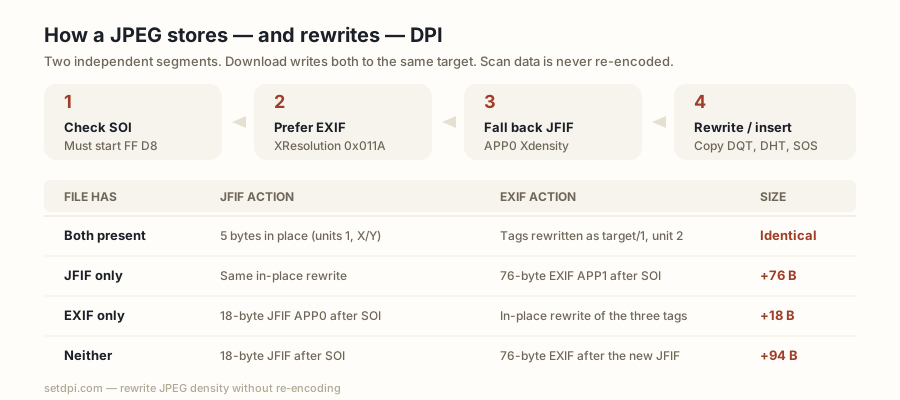
This page walks JPEG marker segments starting after SOI (FF D8) and stops at SOS (FF DA). It first looks for an APP1 segment starting with Exif\0\0. If that EXIF block’s IFD0 contains XResolution (tag 0x011A, type RATIONAL = 32-bit numerator / 32-bit denominator), the value numerator÷denominator is used, with ResolutionUnit (tag 0x0128, SHORT) read as 2 = inch or 3 = centimetre (a centimetre value is multiplied by 2.54); if ResolutionUnit is absent, inch is assumed. Only IFD0 is read (not sub-IFDs); only XResolution is read for display.
If no usable EXIF value exists it falls back to the JFIF APP0 segment (JFIF\0): units byte 1 = dots per inch → Xdensity (16-bit big-endian) is shown as is; 2 = dots per centimetre → Xdensity × 2.54, rounded; 0 = no units / aspect ratio only → treated as not set. If neither gives a value the row shows the “DPI not set” badge. So when JFIF and EXIF disagree this page shows the EXIF XResolution value. They can disagree because they are two independent segments: they may be written by different software, one may be updated on re-save while the other is not, and readers commonly differ in which one they prefer.
| Field | Where | Type | Meaning |
|---|---|---|---|
| JFIF units | APP0 | 8-bit | 0 = no units / aspect only; 1 = dots per inch; 2 = dots per centimetre |
| JFIF Xdensity / Ydensity | APP0 | 16-bit big-endian | Density in the units-byte unit; max 65535 |
| EXIF XResolution | APP1 IFD0, tag 0x011A | RATIONAL | Shown when present (numerator÷denominator) |
| EXIF YResolution | APP1 IFD0, tag 0x011B | RATIONAL | Written on download; not used for the badge |
| EXIF ResolutionUnit | APP1 IFD0, tag 0x0128 | SHORT | 2 = inch; 3 = centimetre; absent → inch |
What this tool writes
The download is built from a copy of the original bytes. If a JFIF APP0 exists: its units byte is set to 1 (inches) and both Xdensity and Ydensity are set to the target as 16-bit big-endian values — 5 bytes changed in place, nothing moves. If an EXIF APP1 exists and its IFD0 contains XResolution / YResolution / ResolutionUnit: XResolution and YResolution are rewritten as the rational target/1 and ResolutionUnit is set to 2 (inch), using the file’s own byte order (II little-endian or MM big-endian), in place. An EXIF block that lacks those three tags is left exactly as it is and no second EXIF block is added.
If there is no JFIF APP0: an 18-byte JFIF APP0 (FF E0, length 16, JFIF\0, version 1.02, units 1, Xdensity = Ydensity = target, 0×0 thumbnail) is inserted immediately after SOI. If there is no EXIF APP1: a 76-byte EXIF APP1 (FF E1, length 74, Exif\0\0, little-endian TIFF header, one IFD0 with exactly three entries — XResolution, YResolution, ResolutionUnit = 2 — and the two rationals target/1) is inserted immediately after SOI (after the new JFIF when both are inserted, so the order after SOI is JFIF, EXIF, then the original segments).
Everything else — DQT quantization tables, DHT Huffman tables, SOF frame header, SOS and the entropy-coded scan data, EOI, ICC profiles, XMP, comments — is copied byte for byte. JFIF density is a 16-bit field, so it can hold at most 65535; the custom box allows 1–10000.
| File has | JFIF action | EXIF action | Size change |
|---|---|---|---|
| Both present | 5 bytes in place (units 1, X/Y = target) | Tags rewritten in place as target/1, unit 2; left as-is if the three tags are missing | Identical |
| JFIF only | Same in-place rewrite | 76-byte EXIF APP1 inserted after SOI | +76 bytes |
| EXIF only | 18-byte JFIF APP0 inserted after SOI | In-place rewrite of the three tags when they exist | +18 bytes |
| Neither | 18-byte JFIF APP0 inserted after SOI | 76-byte EXIF APP1 inserted after the new JFIF | +94 bytes |
Quality, pixels and file size are untouched
The image is never decoded or re-encoded. Quantization tables, Huffman tables and scan data are copied byte for byte, so quality is identical. A JPEG re-save typically decompresses the scan and re-quantizes it — a lossy step this page does not take. Pixel dimensions are not edited.
The sample button draws on a canvas and exports it via toBlob('image/jpeg', 0.92) as sample-photo.jpg. Whether that export carries a JFIF density or EXIF is up to the browser, so the row may read “DPI not set”.
Camera JPEGs, exported JPEGs and AI-generated JPEGs
Camera files commonly carry an EXIF APP1 with XResolution/YResolution and may have no JFIF APP0; this page then rewrites the EXIF rationals and inserts an 18-byte JFIF. Exported or edited files commonly carry a JFIF APP0 and may or may not carry EXIF. Files from AI image generators commonly carry a screen density such as 72 or 96, or no density at all. When no usable density is found the row reads “DPI not set”; on download a block that exists is rewritten in place and a block that is missing is inserted.
Where a 300 DPI JPEG is required
Print pipelines commonly read the density tag. A file tagged 72 may be treated as low resolution even when it has plenty of pixels. Screens typically ignore the tag.
| Job | Typical density ask |
|---|---|
| Photo print shops | Typically 300 DPI |
| Book cover and interior uploads | Typically 300 DPI |
| Journal photographs | Typically 300 DPI; line art often 600 |
| Passport and ID photos | Typically 300 DPI |
| Magazine ads | Typically 300 DPI |
| Marketplace printables | Commonly 300 DPI |
| Screens | Density is typically ignored |
Raising the tag does not add pixels. Print inches = pixels ÷ DPI. A 1200 × 1800 px JPEG at 300 DPI prints 4 × 6 in; at 72 it claims 16.7 × 25.0 in. The row shows that print size for the current target, in inches and centimetres. If both sides would print under 4 inches, a warning notes that raising the DPI tag does not add pixels.