BMP DPI Changer
Drop a BMP — its biXPelsPerMeter and biYPelsPerMeter fields are rewritten to 300 DPI (or any value) in your browser. Pixel array, palette and file length stay untouched. Nothing is uploaded.
How to change BMP DPI in the browser
Add BMP files
Drop BMP files above, or click to browse. The file picker accepts .bmp / image/bmp / image/x-ms-bmp. Up to 50 files are kept from each drop. Non-BMP files are skipped with a per-file notice pointing at the homepage for JPEG and PNG. An OS/2 BMP is skipped because its header has no DPI field.
Choose the target DPI (300 is preselected)
300 is selected when the page loads. Use 72, 96, 150, 200, 600 or 1200, or type a custom integer from 1 to 10000. The print-size line on each row updates to pixels ÷ DPI.
Download
Click Download. The two int32 pixels-per-metre fields are rewritten in the browser. Pixels are untouched and nothing is uploaded. A file called name.bmp tagged 300 is saved as name_300dpi.bmp; the original extension is kept.
Each dropped file is read as a byte array in the page. Bytes 0–1 are checked for the ASCII signature BM. If they do not match, that file is skipped and a notice is appended under the drop zone, with a link to the homepage for JPEG and PNG. A valid Windows BMP — BITMAPINFOHEADER or later — is listed with its current DPI reading (or a “DPI not set” badge), a thumbnail the browser can decode from the original bytes, and pixel dimensions read from the DIB header. Files never leave the browser.
Download (and Download all) works on the original bytes: biXPelsPerMeter and biYPelsPerMeter are overwritten in place, so the file length does not change. The saved name is the original stem, an underscore, the target DPI, the letters dpi, and the original extension. Clearing the list also hides the skip notice and removes its rows.
How a BMP stores resolution
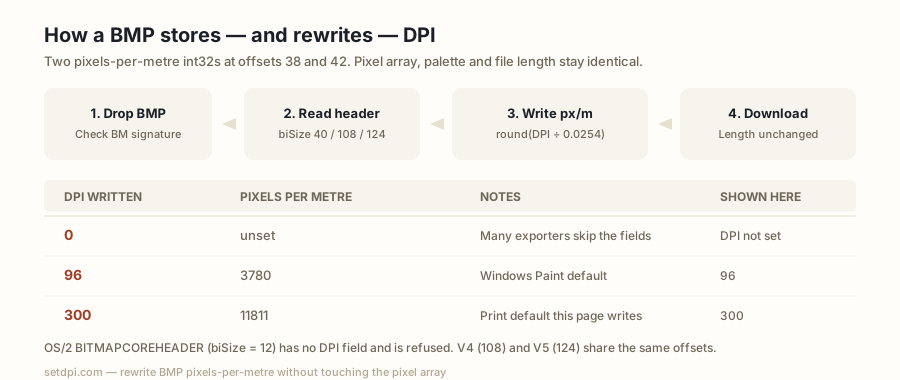
A BMP begins with a 14-byte BITMAPFILEHEADER: the ASCII signature BM, a 32-bit file size, four reserved bytes, and a 32-bit offset to the pixel array. Immediately after that, at offset 14, sits the DIB header. Its first field is biSize, a uint32 little-endian length that tells a reader which header layout follows.
Resolution lives in two signed 32-bit little-endian fields of BITMAPINFOHEADER: biXPelsPerMeter at offset 14+24 = 38, and biYPelsPerMeter at offset 42. They store pixels per metre, not pixels per inch. This page converts with the same 0.0254 metres-per-inch factor PNG uses for pHYs: reading multiplies by 0.0254 and rounds; writing divides by 0.0254 and rounds. 300 DPI is stored as 11811 px/m; 96 DPI is stored as 3780 px/m, which is the value Windows Paint writes; 0 means the density is unset.
| DPI written | Pixels per metre stored | Exact value read back (ppm × 0.0254) | Shown here |
|---|---|---|---|
| 72 | 2835 | 72.0090 | 72 |
| 96 | 3780 | 96.0120 | 96 |
| 150 | 5906 | 150.0124 | 150 |
| 200 | 7874 | 199.9996 | 200 |
| 300 | 11811 | 299.9994 | 300 |
| 600 | 23622 | 599.9988 | 600 |
| 1200 | 47244 | 1199.9976 | 1200 |
A file whose both fields are 0 is shown as “DPI not set”. The badge uses biXPelsPerMeter; both fields are written to the same integer on download so the stored density is square. None of the seven presets divides evenly by 0.0254, so every value read back is within 0.013 DPI of the number you chose; this page rounds to the nearest whole number and shows 300 for 11811.
OS/2 and V4/V5 headers
Not every BMP uses the 40-byte BITMAPINFOHEADER. The oldest layout, BITMAPCOREHEADER / OS/2 1.x, has biSize === 12. That header holds only width, height, planes and bit count as 16-bit fields — there is no pixels-per-metre slot at all. This page refuses those files: the row is never listed, a per-file notice reads “This BMP uses the old OS/2 header, which has no DPI field”, and the bytes are never modified.
BITMAPV4HEADER sets biSize to 108 and BITMAPV5HEADER sets it to 124. Both extend BITMAPINFOHEADER without moving the early fields, so biXPelsPerMeter and biYPelsPerMeter still sit at offsets 38 and 42. This page handles any header whose biSize is 40 or more, including 108 and 124, by reading and writing those two offsets and leaving the extra colour-space and profile bytes alone.
| biSize | Header | DPI fields | This page |
|---|---|---|---|
| 12 | BITMAPCOREHEADER (OS/2 1.x) | None | Refused, never modified |
| 40 | BITMAPINFOHEADER | int32 at offsets 38 and 42 | Read and written |
| 108 | BITMAPV4HEADER | Same offsets | Read and written |
| 124 | BITMAPV5HEADER | Same offsets | Read and written |
A truncated file that claims BM but does not contain the four bytes of biSize, or that claims a 40-byte-or-larger header but ends before offset 46, cannot be read and is skipped rather than listed.
What changes and what doesn't
Only two fields change. writeBmpDpi copies the file, writes round(dpi ÷ 0.0254) into the int32 at offset 38 and the int32 at offset 42, and returns the copy. Nothing else is visited: the pixel array (whether uncompressed, RLE, or bitfields), the colour palette, the compression flag, biSize, width, height, bit count, and the 14-byte file header stay byte-identical. Because eight bytes are overwritten in place, the file length is unchanged.
The preview thumbnail is decoded by the browser for display only; the download is built from the original byte array. A 2×2 24-bit BMP with a 40-byte header is 70 bytes before and 70 bytes after a 300 DPI write; only the eight density bytes differ. The pixel array starts after the headers and is copied as a range, never decoded.
The sample BMP button builds a 160 × 120 pixel, 24-bit uncompressed BMP with both fields set to 0, so the row shows “DPI not set” and downloading it takes the in-place path: length stays the same, and a reader that understands the fields then sees 300 (or whatever target is selected).
Where BMP DPI still matters
BMP is an old container, but the two pixels-per-metre fields are still read in a few places that treat the tag as physical size.
Windows print dialogs and the Photos app size a BMP from those fields: a scan tagged 300 is offered at its claimed print inches, while the same pixels tagged 0 or 96 may be treated as a screen-sized image. Scanner archives often land as BMP with the scan setting already written — or with 0, if the exporter skipped the fields. Embroidery and plotter software commonly reads biXPelsPerMeter to scale a stitch or cut path to millimetres. Legacy print workflows that still accept BMP for line art or a one-bit mask will bounce a file tagged 72 as low resolution even when it holds plenty of pixels.
| Job | Typical density ask |
|---|---|
| Windows print dialogs and Photos app sizing | Often 300 DPI; 0 or 96 is treated as screen-sized |
| Scanner archives saved as BMP | Commonly 300–600 DPI, or 0 if unset |
| Embroidery and plotter software | Reads pixels-per-metre to scale to millimetres |
| Legacy print workflows (line art, one-bit masks) | Typically 300–600 DPI |
| Windows Paint exports | 96 DPI (3780 px/m) |
| Screens | 72–96 DPI, and typically ignored |
Rewriting 300 (or the number on the brief) is what this page does; it adds no pixels. Print inches = pixels ÷ DPI. A 2400 × 3000 px BMP tagged 300 claims 8 × 10 in; tagged 96 it claims 25.0 × 31.3 in. The row shows that print size for the current target in inches and centimetres, and warns when both sides fall under 4 in that a higher tag will not create a larger sharp print.
Use 300 when a Windows print checklist or a plotter driver typically wants to see it. Use 96 when you mean the value Paint writes. Use 72 only for a screen density. The presets and the custom box cover those values; the downloaded fields are the integer you selected, stored as pixels per metre.
BMP vs PNG
PNG stores density in a pHYs chunk as pixels per metre with a unit byte; 300 DPI is 11811 px/m there too, which is why some PNG readers show 299.99. A BMP stores the same unit in two header int32s and has no separate unit flag: 0 means unset, any positive value is pixels per metre. Neither format stores inches natively.
This page reads and writes BMP only. The file input accepts .bmp, image/bmp, image/x-ms-bmp. A PNG, JPEG or TIFF is skipped with a per-file notice pointing to the homepage, which handles JPEG and PNG. For a PNG-only rewrite of pHYs, use the PNG DPI changer.
Because BMP density is two fixed offsets, there is nothing to insert and nothing to reconcile: the reader looks at offset 38, and the writer overwrites offsets 38 and 42. PNG may have to insert a 21-byte chunk when pHYs is missing; a BMP whose fields are 0 is rewritten in place and does not grow.