PNG DPI Changer
Drop a PNG — its pHYs density chunk is rewritten to 300 DPI (or any value) in your browser. Pixels, transparency and palette stay untouched. Nothing is uploaded.
How to change PNG DPI in the browser
Add PNG files
Drop PNG files above, or click to browse. The file picker accepts .png / image/png only. Up to 50 files are kept from each drop. Non-PNG files are skipped with a per-file notice — no alert.
Choose the target DPI (300 is preselected)
300 is selected when the page loads. Use 72, 96, 150, 200, 600 or 1200, or type a custom integer from 1 to 10000. The print-size line on each row updates to pixels ÷ DPI.
Download
Click Download. The pHYs chunk is rewritten in the browser. Pixels are untouched and nothing is uploaded. A file tagged 300 is named name_300dpi.png.
Each dropped file is read as a byte array in the page. The eight-byte PNG signature is checked first. If it does not match, that file is skipped and a notice is appended under the drop zone, with links to the JPEG DPI changer and the homepage. A valid PNG is listed with its current pHYs reading (or a “DPI not set” badge), a thumbnail, and pixel dimensions once the browser has decoded the preview. Files never leave the browser.
Download (and Download all) works on the original bytes: an existing 9-byte pHYs is overwritten in place; otherwise a 21-byte chunk is inserted immediately before the first IDAT. The saved name is the original stem, an underscore, the target DPI, the letters dpi, and the original extension. Clearing the list also hides the skip notice and removes its rows.
How a PNG stores DPI: the pHYs chunk
A PNG is an 8-byte signature followed by chunks. Each chunk is a 4-byte length, a 4-byte type, that many data bytes, and a 4-byte CRC. Density, when present, lives in a chunk whose type is pHYs (physical pixel dimensions).
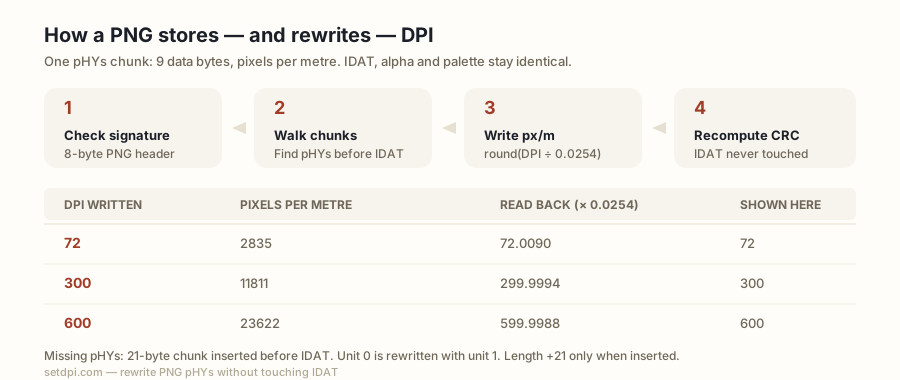
A pHYs chunk carries 9 data bytes — 4-byte X pixels per unit, 4-byte Y pixels per unit, 1-byte unit (1 = metre, 0 = unknown / aspect only). PNG has no inch unit, so 300 DPI is stored as 300 ÷ 0.0254 = 11811.02…, rounded to 11811 pixels per metre; reading 11811 back gives 299.9994 DPI, which is why some readers display 299.99 while this page rounds to 300.
The specification requires pHYs before the first IDAT. This tool writes the value in place when a pHYs exists (9 data bytes overwritten, file length unchanged) and otherwise inserts a 21-byte pHYs chunk (4 length + 4 type + 9 data + 4 CRC) immediately before the first IDAT; in both cases the chunk CRC is recomputed over the type and data bytes. A pHYs whose unit byte is 0 is reported as “DPI not set” and rewritten with unit 1.
X and Y are always written to the same pixels-per-metre integer, so the stored density is square. The CRC covers the four type bytes plus the nine data bytes, the standard PNG CRC range. Reading multiplies the stored integer by 0.0254 and rounds to the nearest whole number, which is why 11811 displays as 300 here.
| DPI written | Pixels per metre stored | Exact value read back (ppm × 0.0254) | Shown here |
|---|---|---|---|
| 72 | 2835 | 72.0090 | 72 |
| 96 | 3780 | 96.0120 | 96 |
| 150 | 5906 | 150.0124 | 150 |
| 200 | 7874 | 199.9996 | 200 |
| 300 | 11811 | 299.9994 | 300 |
| 600 | 23622 | 599.9988 | 600 |
| 1200 | 47244 | 1199.9976 | 1200 |
The pixels-per-metre column is the integer this page writes: the DPI divided by 0.0254, rounded. None of the seven presets divides evenly, so every value read back is within 0.013 DPI of the number you chose. A reader that truncates to two decimals prints 299.99, 599.99 or 1199.99; one that rounds to two decimals prints 300.00; this page rounds to the nearest whole number and shows 300. All of them are reading the same correct chunk.
When a PNG has no pHYs chunk at all
pHYs is optional in the PNG format. Many producers omit it. Browser canvas exports, screenshots from some tools, web-optimised exports, and exports from design apps or AI image generators often either omit pHYs or write a screen value such as 72 or 96. This page shows “DPI not set” when no pHYs with unit 1 and a positive X density is found — that covers a missing chunk and a unit-0 chunk. On download a missing chunk is inserted as a 21-byte pHYs immediately before the first IDAT, with unit 1 and X/Y set to the target you chose; a unit-0 chunk is rewritten in place with the same values.
The sample PNG button draws on an HTML canvas and exports it as image/png; whether that export carries a pHYs chunk is up to the browser. If it does not, the row reads “DPI not set” and downloading it takes the insert path: the saved file is 21 bytes larger than the original, later chunks shift by 21 bytes, and a reader that understands pHYs then sees 300 (or whatever target is selected). If a file already has a 9-byte pHYs, download overwrites those nine data bytes and the CRC; length stays the same.
PNG DPI vs JPEG DPI
JPEG stores density in the JFIF APP0 segment (a units byte and 16-bit X/Y density, so 300 is stored as exactly 300 with unit = inch) and optionally in EXIF XResolution / YResolution rationals. PNG has a single pHYs in pixels per metre, so 300 can only be stored as 11811 px/m — this is why a PNG may show 299.99 where a JPEG shows 300, and why a JPEG can carry two conflicting values while a PNG carries one.
This page reads and writes PNG only. The file input accepts .png,image/png. JPEG functions are not on this page: a JPEG (or any non-PNG) is skipped with a per-file notice pointing to the JPEG DPI changer and the homepage. The homepage Image DPI Changer handles both JPEG and PNG with the same lossless rewrite idea; this page exists so the phrase “png dpi changer” lands on a PNG-only tool.
Because PNG density is one chunk, there is nothing to reconcile: the reader walks the chunk list until it finds a 9-byte pHYs with unit 1, and the writer overwrites the first 9-byte pHYs it finds or inserts one. JPEG’s two stores can disagree; that problem does not exist here.
Transparency, palette, 16-bit and APNG are untouched
The code never decodes the image. It walks the chunk list, overwrites or inserts pHYs, and copies every other byte unchanged — IDAT (pixel data) is never modified, nor are IHDR, PLTE, tRNS, gAMA, iCCP, sRGB, or APNG chunks (acTL / fcTL / fdAT); so alpha transparency, indexed palettes, 16-bit depth, interlacing and animation come out exactly as they went in.
The preview thumbnail is decoded by the browser for display only; the download is built from the original byte array. Insertion shifts later bytes by 21, which is fine because PNG chunks are self-delimiting: each chunk carries its own length, so a 21-byte insert before the first IDAT does not require rewriting later length fields. The in-place path does not shift anything; only the nine data bytes and the four CRC bytes of pHYs change.
The only new or changed bytes in the download are the pHYs chunk itself. File size therefore stays identical when pHYs already existed, and grows by exactly 21 bytes when it did not.
Where a 300 DPI PNG is required
PNG is the format chosen when transparency must survive — logos, stickers, cut-outs, and DTG / print-on-demand artwork. Print pipelines that accept PNG typically check the pHYs value the same way they check JPEG density, so a transparent PNG tagged 72 may be bounced as low resolution even when it has plenty of pixels. Rewriting 300 (or the number on the brief) is what this page does; it adds no pixels.
| Job | Typical density ask |
|---|---|
| Print-on-demand transparent artwork | Typically 300 DPI |
| Sticker and decal shops | Typically 300 DPI |
| Etsy printables and wall art | Commonly 300 DPI |
| Journal line-art figures | Typically 300–600 DPI; many journals accept PNG for line art, though TIFF or EPS may be preferred |
| Packaging and labels | Typically 300 DPI |
| Screens | 72–96 DPI, and typically ignored |
Raising the tag does not add pixels. Print inches = pixels ÷ DPI. A 1200 × 1800 px PNG tagged 300 claims 4 × 6 in; tagged 72 it claims 16.7 × 25.0 in. The row in the tool shows that print size for the current target, in inches and centimetres. If both sides fall under 4 in, a warning notes that a higher tag will not create a larger sharp print.
Use 300 when that is the number a print-on-demand checklist, a sticker shop, or a journal figure guide typically wants to see on a transparent PNG. Use 600 when a line-art guideline asks for it. Use 72 or 96 only when you mean a screen density. The presets and the custom box cover those values; the downloaded pHYs is the integer you selected, stored as pixels per metre with unit 1.